Aseprite Script: Amiga ACE Palette Exporter
A downloadable tool
This Aseprite extension provides tools for working with Amiga palettes: adjusting colors to the 12-bit OCS format and exporting to the ACE .plt format used by the ACE game engine.
https://sphair.itch.io/aseprite-script-plt-export
Changelog
v1.1.0
- Added Adjust to Amiga Palette (12-bit) command - converts palette colors to Amiga-compatible 12-bit precision
v1.0.0
- Added Export ACE Palette (.plt) command - exports palette to ACE .plt format for Amiga development
Installation
As Extension
- Download
pltexport.aseprite-extension - In Aseprite, go to Edit > Preferences > Extensions
- Click Add Extension and select
pltexport.aseprite-extension - Restart Aseprite
- The commands will appear in the Palette menu (palette panel dropdown)
As Standalone Script
You can also run Amiga ACE Palette Export.lua directly from File > Scripts > Run Script without installation. Note, with this approach you only get access to the PLT exporter, not the palette tools.
Usage
Adjust to Amiga Palette (12-bit)
Converts all colors in the current palette to Amiga-compatible 12-bit colors (4096 color palette):
- Open a sprite with an indexed palette in Aseprite
- Click the menu button in the Palette panel and select Adjust to Amiga Palette (12-bit)
- All palette colors will be adjusted to 4-bit precision per channel
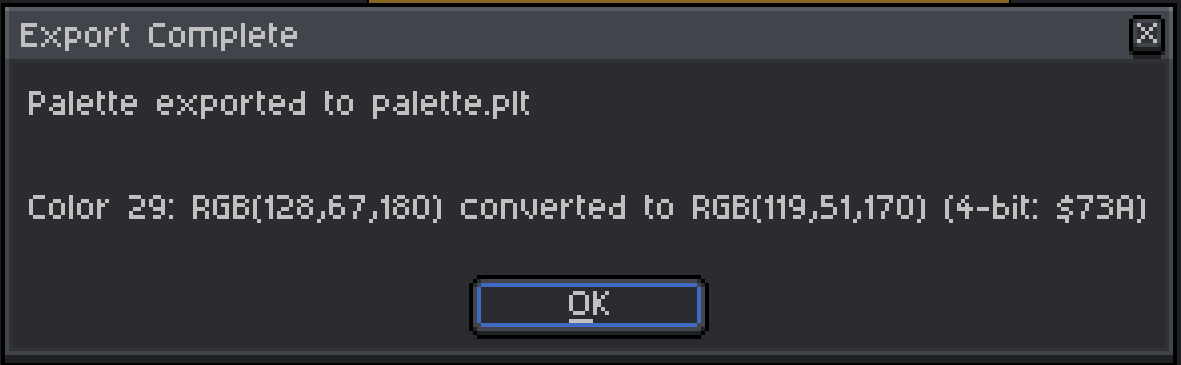
- A summary shows which colors were changed
This works on any number of colors and modifies the palette in place (can be undone with Ctrl+Z).
Export ACE Palette (.plt)
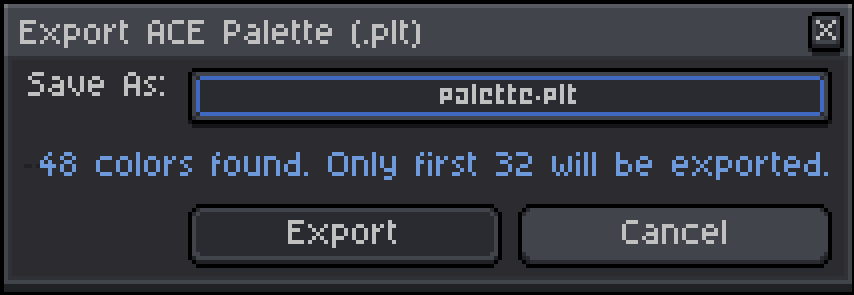
Exports the palette to ACE .plt format (limited to 32 colors):
- Open a sprite with a palette in Aseprite
- Click the menu button in the Palette panel and select Export ACE Palette (.plt)
- Choose a filename and location
- Click Export
PLT Format Specification
The ACE .plt format is a simple binary format:
Offset | Size | Description
-------|------|-----------
0x00   | 1    | Color count (1-32)
0x01   | 2*N  | Color data (2 bytes per color)
Color Encoding
Each color is stored in 2 bytes representing Amiga OCS 12-bit color:
- Byte 1:
0000RRRR- Lower 4 bits contain Red channel (0-15) - Byte 2:
GGGGBBBB- Upper 4 bits contain Green, lower 4 bits contain Blue
This matches the Amiga OCS color format where each RGB channel has 4-bit precision (16 levels per channel).
Color Conversion
8-bit RGB colors (0-255) are converted to 4-bit (0-15) using the same method as the Amiga OCS Palette Mixer:
8-bit to 4-bit (export):
value_4bit = floor(value_8bit / 255 * 15)
Example
A palette with 3 colors:
- Color 0: RGB(255, 0, 0) → Red = 15, Green = 0, Blue = 0 → Bytes: 0x0F, 0x00
- Color 1: RGB(0, 255, 0) → Red = 0, Green = 15, Blue = 0 → Bytes: 0x00, 0xF0
- Color 2: RGB(0, 0, 255) → Red = 0, Green = 0, Blue = 15 → Bytes: 0x00, 0x0F
File contents (hex): 03 0F 00 00 F0 00 0F
Loading in ACE
Use the ACE palette functions to load the .plt file:
#include <ace/utils/palette.h>
UWORD palette[32];
paletteLoadFromPath("data/mypalette.plt", palette, 32);
License
This is free and unencumbered software released into the public domain. See UNLICENSE for details.
Download
Leave a comment
Log in with itch.io to leave a comment.